
Most webinars don't fail because the offer is bad. They fail in the first ten minutes.
The host thanks everyone for coming, shares a long bio, fixes a slide, asks where people are watching from... and half the room quietly leaves.
A good script fixes that. It tells you what to say, when to say it and how to move from teaching to selling without the awkward gear change. Here's a simple 6 part webinar script you can write in a day, with real lines you can borrow.
Why You Need a Script at All
Some people worry a script will make them sound stiff. The opposite is true.
When you know exactly where you're going, you relax. You stop rambling. You hit every point that matters, and you make the offer with confidence instead of rushing through it at the end.
A script also makes your webinar repeatable. Once it works, you can deliver it again and again, or record it once and run it as an automated webinar that sells while you sleep.
You don't have to read it word for word. Many hosts write the full script, practice it a few times and then present from bullet points. The writing is what makes the talk sharp.
The 6 Part Webinar Script Structure
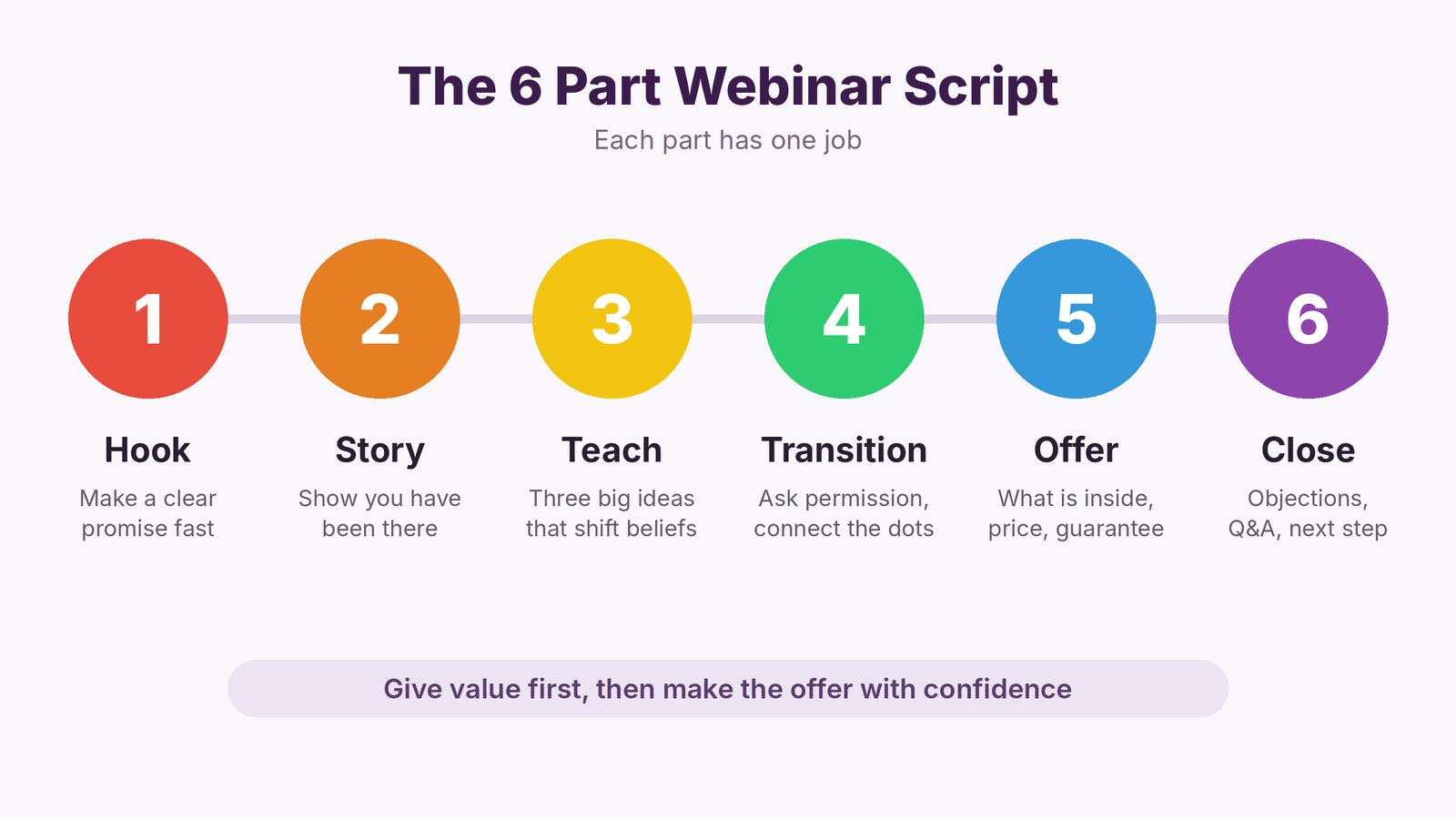
Almost every webinar that sells follows the same path. Each part has one job.
- The hook. Grab attention and make a clear promise in the first few minutes.
- Your story. Show you've been where the viewer is, and how you found a way out.
- The teaching. Share three big ideas that change how the viewer sees the problem.
- The transition. Move from free help to the offer, smoothly and honestly.
- The offer. Show what you're selling, what it includes and why it's worth it.
- The close. Answer objections, give a reason to act now and take questions.
How Much Time to Give Each Part
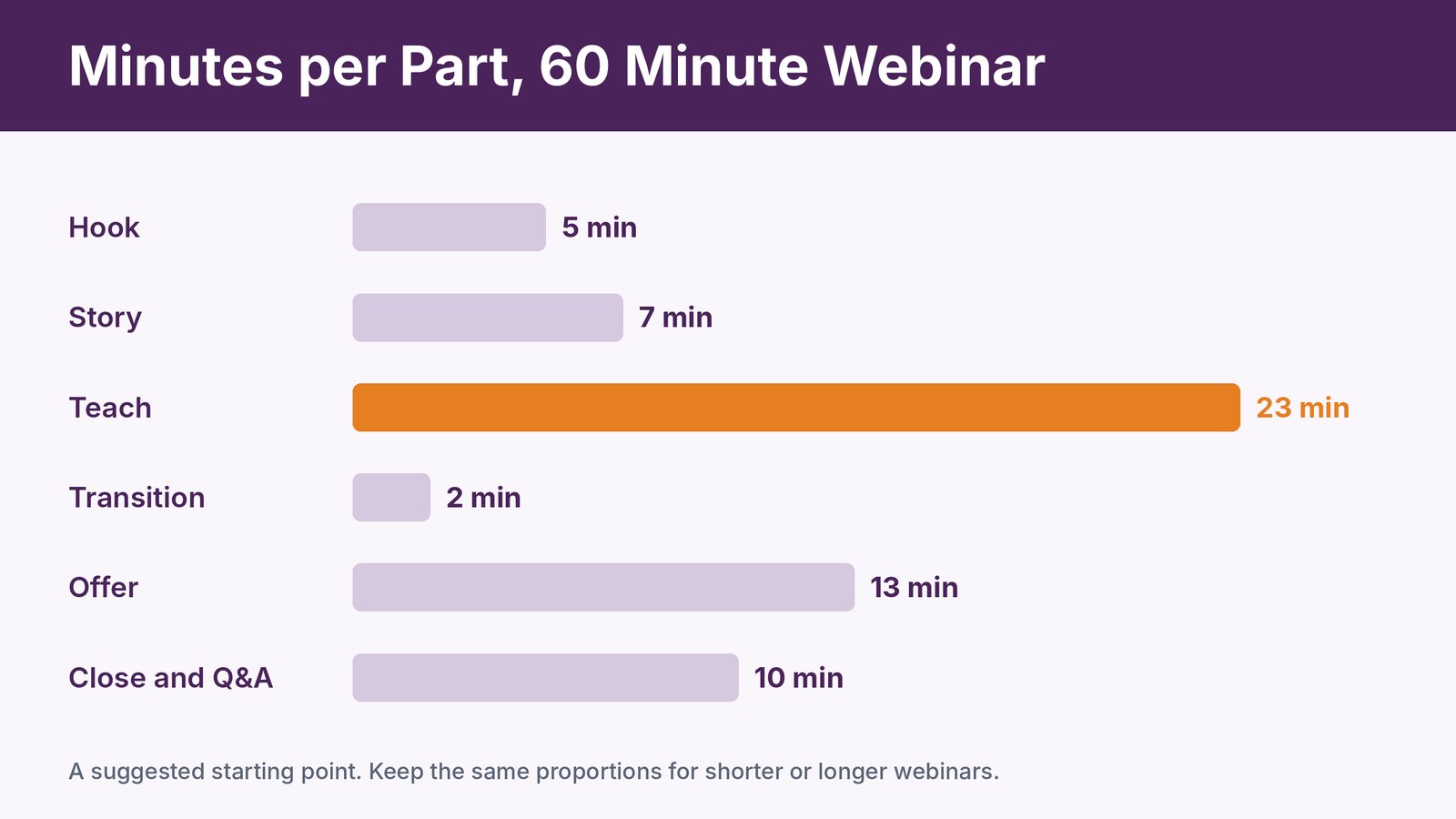
For a 60 minute webinar, this split works well as a starting point. The teaching gets the most time, but the offer and close together get almost as much. That surprises people, and it's one of the biggest reasons scripted webinars sell more.
Shorter webinar? Keep the same proportions. A 30 minute version simply halves each part.
Part 1. Write a Hook That Stops People Leaving
Your first three minutes decide how many people stay. Skip the long welcome and get to the promise.
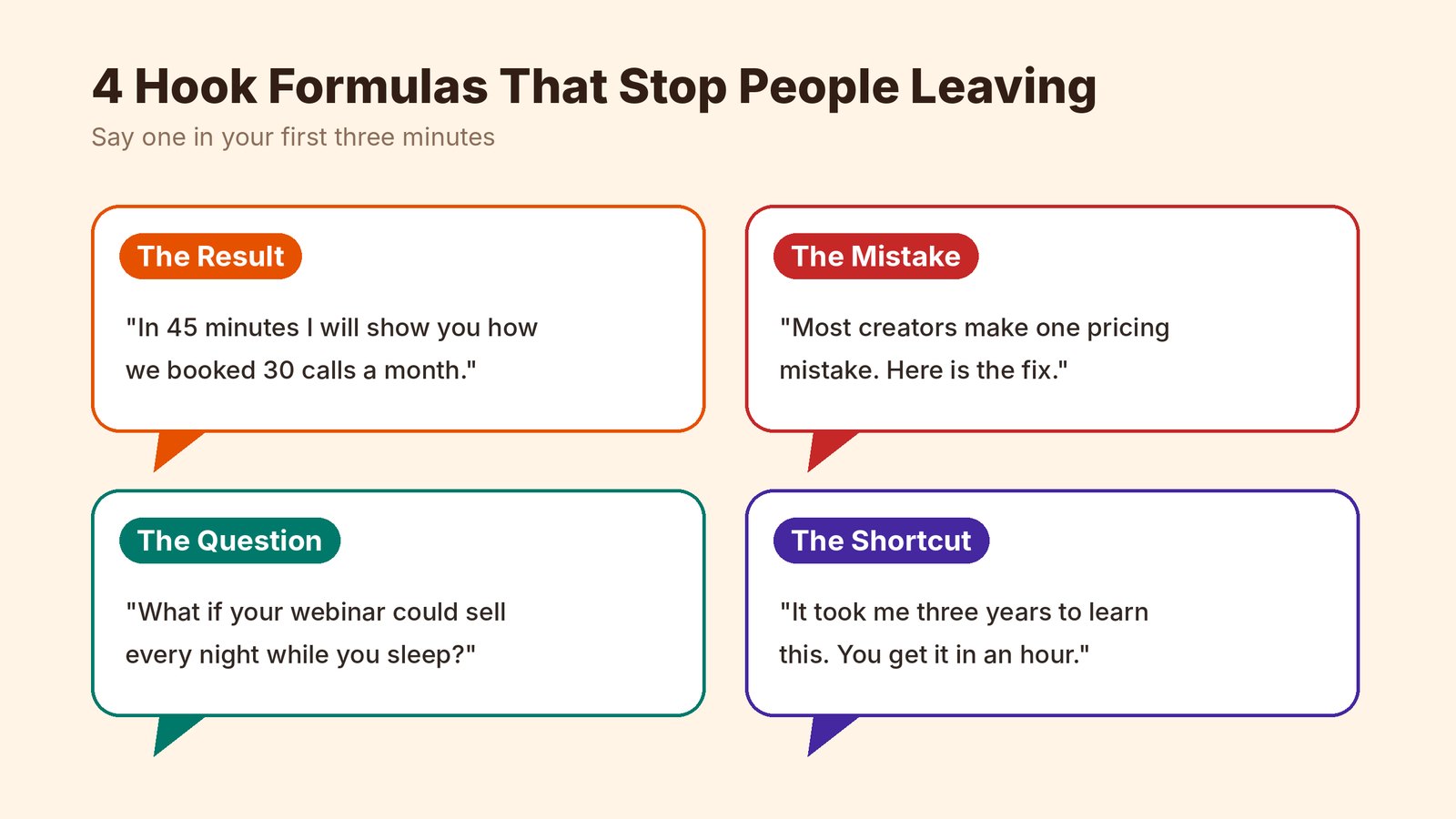
Here are four hook formulas that work.
- The result. "In the next 45 minutes, I'll show you how we booked 30 sales calls a month without ads."
- The mistake. "Most course creators make one pricing mistake that costs them half their sales. Today I'll show you how to fix it."
- The question. "What if your webinar could sell every night while you sleep?"
- The shortcut. "It took me three years to figure this out. You'll get it in under an hour."
Then tell people why they should stay to the end. A bonus, a checklist or a live demo near the finish gives them a reason not to drift away.
Keep your bio short. Two or three sentences about why you're qualified is plenty. People care about their problem, not your résumé.
Part 2. Tell a Story People See Themselves In
Facts tell. Stories sell.
Share a short, honest story about a time you struggled with the same problem your viewers have. What did it cost you? What did you try that didn't work? What changed?
The best webinar stories have a clear low point and a clear turning point. You don't need drama. You need something real.
If you don't have a personal story, use a customer's. "Let me tell you about Sarah. She'd run four webinars and sold nothing..." works just as well.
Part 3. Teach Three Big Ideas
This is the heart of the webinar. Give real value, but be smart about what you teach.
Instead of a full how-to, teach three big ideas that change how viewers think about the problem. Each one should break a false belief that's holding them back.
For example, a webinar about email marketing might teach these three ideas.
- A small list that trusts you beats a big list that doesn't.
- You don't need to write every day if you write the right emails.
- Automation is what makes email feel personal at scale.
Teach the what and the why in depth. Show a little of the how. Viewers leave with real insight, and they see that your offer is the fastest way to put it into action.
Back each idea with an example, a quick story or a screenshot. Abstract advice slides right off people. Concrete examples stick.
Keep People Watching From Start to Finish
Attention dips every few minutes. Plan small moments that pull people back in.
- Ask a question every 5 to 7 minutes. "Type YES in the chat if this has happened to you."
- Run a quick poll. People who click are people who stay.
- Tease what's coming. "In a few minutes I'll show you the exact template we use."
- Change the screen. Switch from slides to a demo or a face-to-camera moment.
- Use their names. Reading out chat comments makes a big room feel small.
Write these moments into your script so you don't forget them when you're nervous.
Part 4. Transition to the Offer Without the Awkward Switch
This is where most hosts stumble. They teach for 40 minutes, then suddenly start selling, and the mood breaks.
A good transition asks permission and connects the dots. Try something like this.
"So now you know the three ideas. The question is how to put them to work without spending months figuring it out alone. I've built something to help with exactly that. Mind if I take a few minutes to show you?"
That's it. Honest, simple and no gear grinding.
Part 5. Present the Offer Clearly
Show your offer in a way that's easy to follow and easy to say yes to.
- Name it. Give the offer a clear name and say what it helps people do.
- Show what's inside. Walk through each part and the result it brings.
- Add bonuses. Extras that remove a common worry, like templates, a setup call or a checklist.
- Show the price. Compare it with the cost of the problem, not with other products.
- Remove the risk. A clear guarantee makes the decision feel safe.
- Tell them how to buy. Show the button and say exactly what happens next.
Say the price once, clearly and calmly. Hesitating on the price makes viewers hesitate too.
Part 6. Close Strong and Handle Objections
Most viewers don't buy because of a few common worries. Answer them before they ask.
| Objection | What you can say |
|---|---|
| "I don't have time." | "That's exactly why we built it. Most people set it up in one afternoon." |
| "It's too expensive." | "Think about what one more client is worth to you. This pays for itself with the first one." |
| "Will it work for me?" | "Here's someone in your exact situation and what happened when they tried it." |
| "I'll do it later." | "The bonuses are only here today, and the problem won't fix itself while you wait." |
| "I'm not technical." | "If you can send an email, you can do this. And we're here if you get stuck." |
Then give a real reason to act now. An honest deadline, a limited bonus or a launch price all work. Fake countdowns that reset every visit don't, and people notice.
Finish with Q&A. Keep the buy button on screen while you answer, and repeat the offer briefly every few questions.
Live Versus Automated Webinar Scripts
The structure stays the same either way, but a few lines change.
For a live webinar, leave room to react. Read chat comments out loud, answer quick questions as they come and adjust your pace if the room feels lost.
For an automated webinar, avoid anything that dates the recording. Skip "happy Monday" and today's news. Write engagement prompts that work for any audience, and time your offer so the buy button can appear at the exact moment you mention it.
Many hosts run the script live a few times first, fix what doesn't land, then record the best version for automation. That way the recording is already proven.
How to Write Your Script in One Day

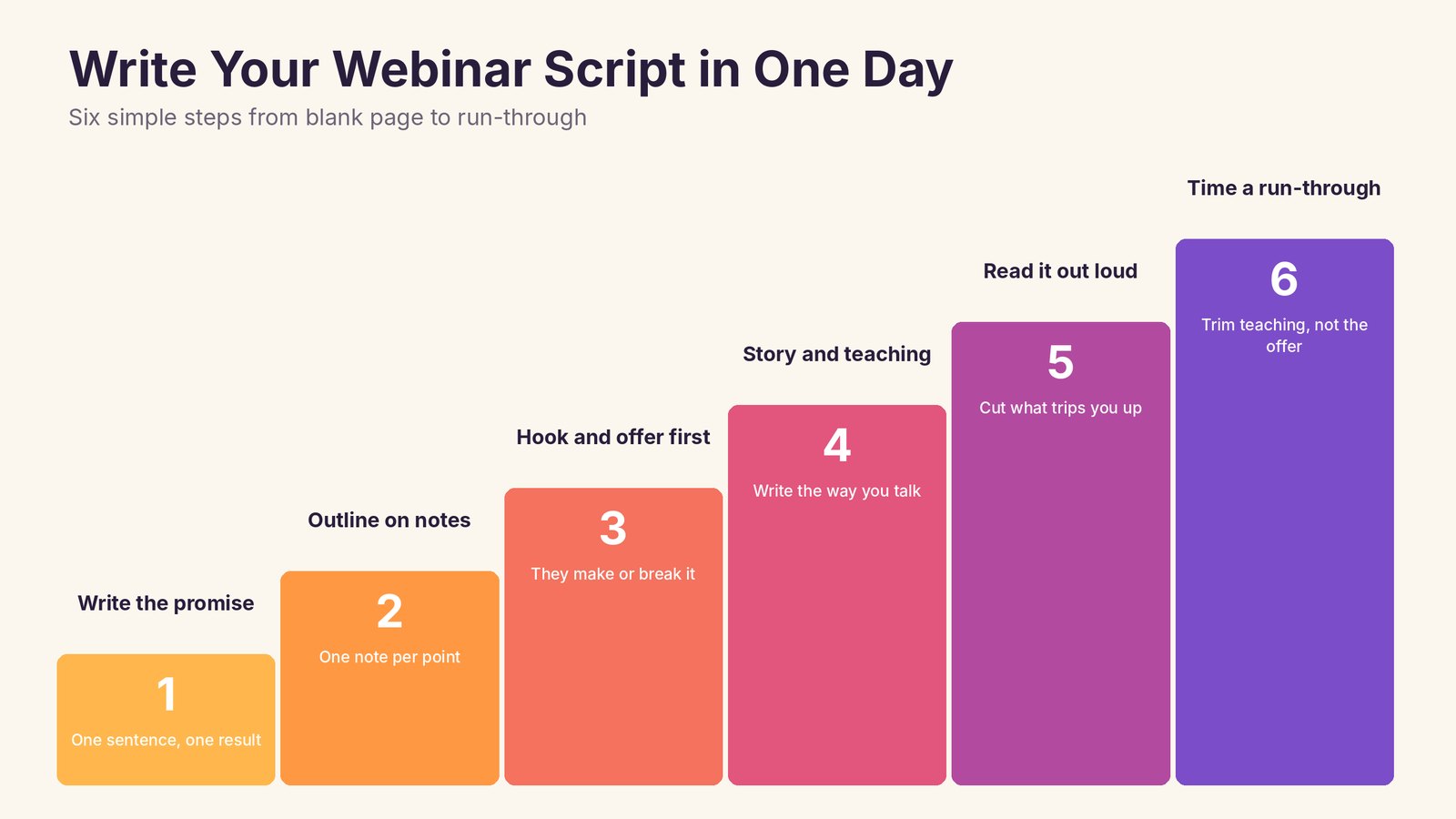
- Write the promise in one sentence. What will viewers be able to do after watching?
- Outline on sticky notes. One note per point, grouped under the six parts. Move them until the flow feels natural.
- Write the hook and the offer first. These two parts make or break the webinar.
- Fill in the story and teaching. Write the way you talk, in short sentences.
- Read it out loud. Cut anything that makes you stumble or sounds like a brochure.
- Time a full run-through. Trim the teaching if you run long, never the offer.
Turn Your Script Into a Webinar That Runs Itself
Once your script works, you don't need to deliver it live every week. Record it once and let it run as an automated webinar. That's what Webinarloop is built for.
- Just in time, scheduled or on-demand sessions, so there's always a time that suits your viewer.
- Simulated chat and an engagement sidebar with polls, surveys and info boxes, timed to match your script's engagement moments.
- Clickable call to action buttons that appear right when your offer starts.
- Automated email reminders so more people actually show up.
- Signup page templates and embeddable forms.
- Analytics and retention reports that show exactly where viewers leave, so you know which part of the script to fix.
Webinarloop costs $5.58 a month, paid yearly ($67 a year), or $6.99 month to month, with a 30 day refund.
Want the full setup? Read our guide on how to create an evergreen webinar that sells 24/7, and fill the room with our tips on getting more people to show up to your webinar.
Common Webinar Script Mistakes
A long, slow start. Housekeeping and bios kill momentum. Get to the promise fast.
Teaching everything. If viewers get the full how-to for free, they don't need your offer. Teach the ideas, not every step.
Rushing the offer. Many hosts run out of time and squeeze the offer into the last two minutes. Protect that time in your script.
No engagement moments. Without questions and polls, viewers drift to their inbox.
Never updating the script. Check where people leave and what they ask in Q&A, then improve the script every few weeks.
Frequently Asked Questions
How long should a webinar script be?
People speak around 130 to 150 words a minute, so a 60 minute webinar is roughly 7,000 to 8,000 words if you write every line. Many hosts write the key parts in full and the rest as bullet points.
Should I read my webinar script word for word?
Usually not. Write it in full to sharpen your thinking, practice it a few times, then present from notes. Read word for word only for the hook and the offer if you get nervous.
How long should a sales webinar be?
Most sales webinars run 45 to 90 minutes. Sixty minutes is a good default. Shorter works for simple, lower-priced offers.
When should I make the offer in a webinar?
Around two-thirds of the way through, after you've delivered real value and before energy drops. Leave enough time for the offer and Q&A.
Can I use the same script for an automated webinar?
Yes. Record your best live run, then use a tool like Webinarloop to play it on a schedule or on demand, with chat, polls and buy buttons timed to the script.
Final Thoughts
A webinar script isn't about sounding like a robot. It's about knowing exactly how to help people and how to invite them to take the next step.
Hook them fast, tell a real story, teach three big ideas, then make your offer with confidence. Write it once, improve it a little every few weeks and let it work for you.
Ready to put your script on autopilot? Try Webinarloop for $5.58 a month, paid yearly.